- Home Page /
- Office Products /
- Office Electronics /
- Printers & Accessories /
- Printer Parts & Accessories /
- Printer Ink & Toner /
- Inkjet Ink Cartridges /
- Canon Pixma Pro-200s
0 ratings



Item #:
145836239
Canon Pixma Pro-200s
Item #:
145836239
TJS 10438
Price Details
Excluding Shipping & Custom charges ( Shipping and custom charges will be calculated on checkout )
*All items will import from US
0 ratings
Write a review
In stock
 Imported from USA store
QTY:
Only 2 items left in stock.
Order now and get it around Monday, June 29
Secured transaction
Ubuy works hard to protect your security and privacy. Our advanced payment security system ensures confidentiality by encrypting your information during transmission using AES (Advanced Encryption Standards) and SSL (Secure Socket Layer) protocols. Your payment details are 100% secure as we do not share your payment details with third party sellers.
Our Top Logistics Partners


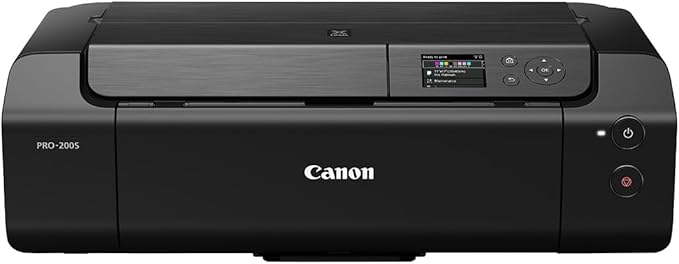
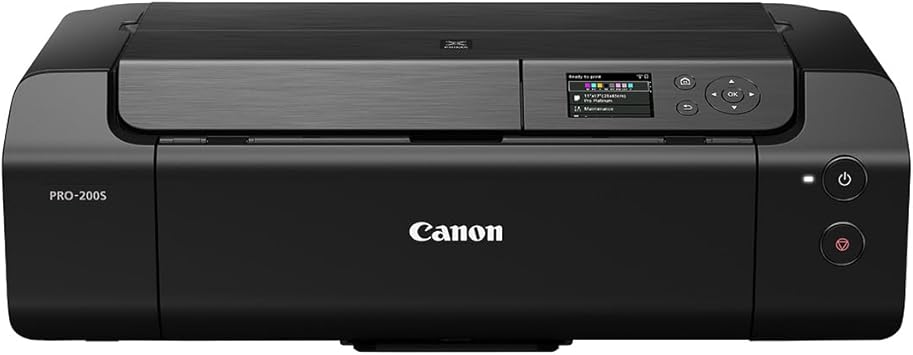
Experience unrivaled print quality with the special 8-ink dye-based colour system of the PIXMA PRO-200S MFP that delivers exceptional reproduction, richer colours and realistic professional printing every time.

Fast
Shipping

Free
Return*

Secure Packaging

100% Original Products

PCI DSS Compliance

ISO 27001 Certified


Note: Step Down Voltage Transformer required for using electronics products of US store (110-120). Recommended power converters Buy Now.


What Stands Out
Vibrant Color Printing
Delivers professional-quality prints with an eight-color dye ink system, ensuring stunning colors and excellent detail, ideal for photographers and artists seeking vibrant reproductions of their work.
Compact Design
Space-saving design allows for easy placement in home or office settings, providing powerful printing capabilities without occupying much space, making it perfect for small studios.
Versatile Media Support
Compatible with various media types, including fine art papers and glossy photo papers, offering users the flexibility to print diverse projects and enhancing creativity in printing applications.
Product Details
- Impressive high-quality images: Experience unparalleled print quality with the special color-based colour ink system of PIXMA PRO-200S multi-function printer PIXMA PRO-200S so you can enjoy outstanding reproduction, richer colors and realistic professional prints every time.
- Choose the right paper: Enjoy great freedom of print by printing on different media types and sizes with this photo printer. Whether it's borderless paper, art or panoramic, this small versatile printer supports multiple media and ensures easy customizable printing.
- Fast and Eco-Friendly: Check ink levels, perform maintenance checks and get easy access to the direct printer instructions with the built-in 3-inch LCD display.
- Perfect Printing Every Time: No more problems with paper adjustment! PIXMA PRO-200S A3 colour printer has 3 different paper feed options and an automatic paper adjustment function that ensures a smooth printing process on all types of paper.
- Smooth Process: Easily switch from editing to printing with the intuitive professional print and layout software from Canon, Professional Print and Layout, that lets you take, edit and print photos from popular photo applications for an all-in-one experience, ranging from retouching to printing.
| Printer Type | Inkjet |
| Other Special Features of the Product | wifi |
| Printer Output Type | Color |
| Item Weight | 14.1 Kilograms |
| Item Dimensions D x W x H | 14.92"D x 25.16"W x 7.87"H (37.9 x 63.9 x 20 cm) |
| Controller Type | Software |
| Print media | Unknown |
| Scanner Type | Photo |
| Compatible Devices | PC |
| Ink Color | Grey |
| Additional Printer Functions | Copy |
| Number of Trays | 3 |
| Processor Count | 1 |
| Resolution | 4800 x 2400 |
| Display Type | LCD |
| Maximum Media Size | A3 |
| Maximum Sheet Capacity | 100 |
| Paper Size | A3 |
| Output sheet capacity | 100 |
| Printer Connectivity Type | Ethernet |
| Hardware Interface | Ethernet, USB 2.0 |
| Number of Ethernet Ports | 3 |
| Total USB 2.0 Ports | 1 |
| Total Usb Ports | 1 |
| Maximum Copy Resolution Color | 4800 x 2400 dpi |
| Maximum Copy Resolution Black and White | 4800 x 2400 dpi |
| Brand | Canon |
| Model Name | PIXMA PRO-200S |
| Model Number | 6875C009AA |
| Built-In Media | Canon Pixma PRO-200S |
| Series Number | 428 |
| Model Series | PIXMA PRO |
| Specific Uses For Product | home office, photo studio or professional photography |
| Manufacturer | Canon |
| Item Type Name | Inkjet Printer |
| Color Pages per Minute | 1 ppm |
| B&W Pages per Minute | 1 ppm |
| Initial Page Print Time | 90 Sekunden |
| Color | blackone |
| Color Depth | 36 bpp |
| Maximum print Resolution Color | 4800 x 2400 dpi |
| Maximum Print Resolution Black and White | 4800 x 2400 dpi |
| Power Consumption | 1.6 Watts |
| Wattage | 1.6 watts |
| Dual-sided printing | Yes |
| Duplex | Automatic |
| Connectivity Technology | Ethernet |
| Printing Technology | Inkjet |
| Special Feature | wifi |
| Printer Output | Color |
| Maximum Print Speed (Color) | 1 ppm |
| Max Printspeed Monochrome | 1 ppm |
| Country of Origin | This item will be imported from US |
What's in the box
Canon Pixma PRO-200S
Who Should Buy?

-
Professional Photographers
Designed for high-quality prints, delivering vibrant colors and sharp details, ideal for showcasing professional portfolios.
-
Graphic Designers
Features exceptional color accuracy and print sizes, making it perfect for creating stunning proofs and presentations.
-
Art Reproductions
Great for artists wanting to produce high-resolution reproductions of paintings or illustrations, maintaining color fidelity and detail.

-
Casual Home Users
Not ideal for general home printing due to its professional-level capabilities and higher ink costs for infrequent users.
-
Budget-Conscious Buyers
The initial cost and maintenance of quality printing may not align with the budgets of users looking for cheaper options.
-
Small Offices
May be too advanced and costly for small offices that require only basic document printing and low-volume needs.
Product Description
Have any Query? Chat with us
Customer Questions & Answers
-
Question:
What printing technology does the Canon Pixma Pro-200s use?
Answer: The Canon Pixma Pro-200s employs an 8-color dye ink system, which enhances color depth and detail in photography. This technology allows for vibrant photo prints with smooth color transitions and a wide color gamut, making it ideal for professional photographers and artists. Whether you are printing images for exhibitions or personal collections, the dye inks ensure that skin tones and landscapes look vivid and lifelike. -
Question:
What types of paper can I use with the Canon Pixma Pro-200s?
Answer: You can use a variety of paper types with the Canon Pixma Pro-200s, including glossy, matte, fine art, and canvas papers. This versatility is essential for artists and photographers who aim to print on different mediums for distinct effects. For example, using glossy paper brings out vibrant colors in photos, while fine art paper allows for textures that enhance the print's artistic value. -
Question:
What are the maximum print dimensions for the Canon Pixma Pro-200s?
Answer: The Canon Pixma Pro-200s can print up to a maximum size of 13 x 19 inches. This capability is beneficial for users who need to produce large-format prints for portfolios, presentations, or displays. For instance, a photographer preparing for a gallery exhibition can produce larger prints that demand attention and showcase intricate details. -
Question:
Is the Canon Pixma Pro-200s compatible with various operating systems?
Answer: Yes, the Canon Pixma Pro-200s is compatible with multiple operating systems, including Windows and macOS. This compatibility ensures that you can use it seamlessly whether you're a PC user or a Mac enthusiast. For example, graphic designers who use applications like Adobe Photoshop can easily print their projects directly from their systems, guaranteeing a smooth workflow. -
Question:
What connectivity options are available for the Canon Pixma Pro-200s?
Answer: The Canon Pixma Pro-200s features multiple connectivity options, including USB, Ethernet, and Wi-Fi. This flexibility allows users to connect directly through a wired setup or wirelessly from various devices. For instance, photographers can print directly from their smartphones or tablets while on the go, making it convenient for capturing and printing spontaneous moments. -
Question:
How does the Canon Pixma Pro-200s handle color accuracy?
Answer: The Canon Pixma Pro-200s is designed with advanced color management features that provide exceptional color accuracy. With its built-in calibration tools and support for ICC profiles, it guarantees precise reproduction of colors, critical for professional printing. For photographers, ensuring that printed images match on-screen colors is paramount when delivering final prints to clients. -
Question:
Can I print borderless photos with the Canon Pixma Pro-200s?
Answer: Yes, the Canon Pixma Pro-200s supports borderless printing, allowing you to print without margins on all paper sizes it supports. This feature is particularly useful for photographers who wish to create stunning, edge-to-edge prints that capture attention. For example, a professional photographer might print a landscape photo without borders to showcase the full impact of the scene. -
Question:
What maintenance is required for the Canon Pixma Pro-200s?
Answer: To keep the Canon Pixma Pro-200s in optimal condition, regular maintenance includes cleaning the print heads and performing nozzle checks. This ensures consistent print quality and prevents clogging. For users who print frequently, following a maintenance routine helps avoid interruptions in projects, allowing for smooth operation during busy printing sessions. -
Question:
What mediums are best for printing with the Canon Pixma Pro-200s?
Answer: The Canon Pixma Pro-200s excels with fine art papers, glossy photo papers, and canvas. Each medium offers distinct advantages; for instance, glossy papers enhance the vibrancy of photographs, while fine art papers provide a more textured finish, ideal for artistic prints. Depending on the desired outcome, choosing the right medium can elevate the overall presentation of visual artworks. -
Question:
Where can I buy Canon Pixma Pro-200s in Tajikistan?
Answer: You can purchase the Canon Pixma Pro-200s from Ubuy, a reliable e-commerce platform that offers a variety of electronics and accessories. Ubuy provides a convenient shopping experience, ensuring you find the right printer with the specifications you need, alongside customer service support to assist with any inquiries.
Canon Inkjet Ink Cartridges 6875C009AA Editorial Review
No editorial reviews found
Customer Reviews & Ratings
39 customers ratings
-
5 Star
71%
-
4 Star
6%
-
3 Star
6%
-
2 Star
6%
-
1 Star
11%
Review this product
Share your thoughts with other customers
Pros
- High-quality color prints
- Easy to set up and use
- Compact and lightweight design
- Supports various paper sizes
- Excellent for photography enthusiasts
Cons
- Slightly noisy during printing
Product Price History
Important information
- Limitations : For products shipped internationally, please note that any manufacturer warranty may not be valid; manufacturer service options may not be available; product manuals, instructions, and safety warnings may not be in destination country languages; the products (and accompanying materials) may not be designed in accordance with destination country standards, specifications, and labeling requirements; and the products may not conform to destination country voltage and other electrical standards (requiring use of an adapter or converter if appropriate). The recipient is responsible for assuring that the product can be lawfully imported to the destination country. When ordering from Ubuy or its affiliates, the recipient is the importer of record and must comply with all laws and regulations of the destination country.
- Not all the products listed on Ubuy are for sale, as Ubuy is a global search engine. Products are subject to export/trade regulations.
TJS 10438
Order now and get it around Monday, June 29
This item is not restrict in my country.(Please click on above link if this item is not restrict in your country, So our team will review and allow.)
QTY:
Only 2 items left in stock.
Secured transaction
Ubuy works hard to protect your security and privacy. Our advanced payment security system ensures confidentiality by encrypting your information during transmission using AES (Advanced Encryption Standards) and SSL (Secure Socket Layer) protocols. Your payment details are 100% secure as we do not share your payment details with third party sellers.
Our Top Logistics Partners
Fastest cross-border delivery
Features & Benefits
- Stunning photo prints with vibrant colors.
- 8-ink dye-based system for exceptional quality.
- Versatile with support for various media types.
- User-friendly features for easy operation.
- Automatic paper realignment for perfect prints.
- Built-in LCD for quick access to functions.