- Домашняя страница /
- Электроника /
- Computer Accessories /
- Computer Accessories & Peripherals /
- Input Devices /
- Digital Pens /
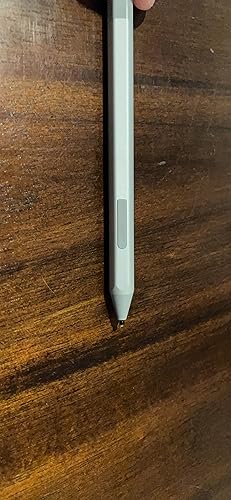
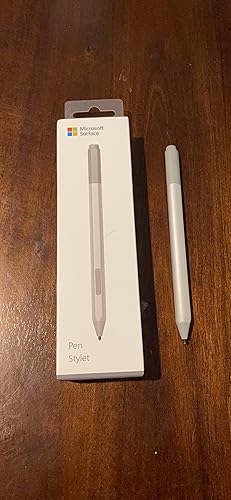
- Microsoft Surface Pen Ice Blue (EYU-00049)
0 ratings


товар №:
18880944
Microsoft Surface Pen Ice Blue (EYU-00049)
товар №:
18880944
TJS 792
Price Details
Excluding Shipping & Custom charges ( Shipping and custom charges will be calculated on checkout )
*All items will import from США
В наличии
 Импортировано из магазина USA
QTY:
На складе осталось всего 9 тов.
Закажите сейчас и получите товар приблизительно Sunday, Август 16
Secured transaction
Ubuy works hard to protect your security and privacy. Our advanced payment security system ensures confidentiality by encrypting your information during transmission using AES (Advanced Encryption Standards) and SSL (Secure Socket Layer) protocols. Your payment details are 100% secure as we do not share your payment details with third party sellers.
Our Top Logistics Partners


Create without limits. New Surface Pen is better and faster than ever.

Fast
Shipping

Free
Return*

Secure Packaging

100% Original Products

PCI DSS Compliance

ISO 27001 Certified


Note: Step Down Voltage Transformer required for using electronics products of США store (110-120). Recommended power converters Купите сейчас.


What Stands Out
Precision Tip
The Surface Pen features a finely crafted precision tip, allowing for accurate writing and drawing, making it ideal for artists and note-takers seeking high precision in their creative tasks.
Tilt and Pressure
With tilt and pressure sensitivity, this pen provides a natural writing experience, enabling users to create varied strokes and shades, enhancing artistic expression and functionality for professionals and hobbyists alike.
Seamless Integration
Designed specifically for Microsoft devices, the Surface Pen integrates effortlessly with Windows applications, enhancing productivity for users who require sophisticated tools for design, education, or business tasks.
Информация о продукте
- Tilt the tip to artistically shade your drawings — just like you would with a graphite pencil
- The rubber eraser on the tail end rubs away your mistakes, just like the eraser on your graphite pencil
- Writes like pen on paper, with precision ink on one end that enables tilt1 and a natural-feeling rubber eraser on the other
- Sketch, shade, and paint with artistic precision and finer control with 4,096 pressure points that respond to the lightest touch
- Ink flows out in real time with no lag or latency. No matter how fast you’re writing or drawing, the ink flows directly from the tip of your Pen to your screen
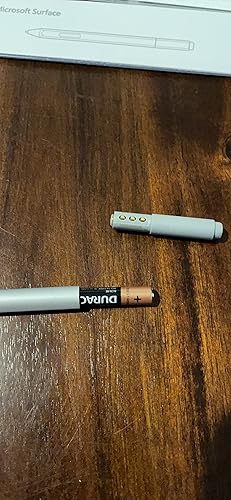
| Number of Batteries | 1 CR2 batteries required. (included) |
| Compatible Devices | Tablet |
| Minimum Required Operating System Version | Windows 10 |
| Item Dimensions | 7 x 0.5 x 2 inches (17.8 x 1.3 x 5.1 cm) |
| Color | Ice Blue |
| Enclosure Material | Rubber |
| Brand | Microsoft |
| Model Number | EYU-00049 |
| UPC | 889842530247 |
| Global Trade Identification Number | 00889842530247 |
| Unit Count | 1 Count |
| Manufacturer | Microsoft Surface Accessories - PC |
| Mfr Part Number | EYU-00049 |
| Material | Rubber |
| Item dimensions L x W x H | 7 x 0.5 x 2 inches (17.8 x 1.3 x 5.1 cm) |
| Number of Packs | 1 |
| Package Weight | 1.0 Pound |
Who Should Buy?

-
Artists and Designers
Ideal for digital artists, allowing precise control and fluid drawing experiences on Surface devices.
-
Students and Educators
Perfect for note-taking and annotating documents, enhancing learning through interactive and handwritten inputs.
-
Professionals and Creatives
Great for designers and architects who require accurate sketching and marking up technical plans on their devices.

-
Casual Users
Not essential for everyday users who primarily use their devices for browsing or simple tasks.
ОПИСАНИЕ ТОВАРА
Есть вопрос? Пообщайтесь с нами в чате
Вопросы и ответы клиентов
-
вопрос:
What devices is the Microsoft Surface Pen compatible with?
отвечать: The Microsoft Surface Pen is primarily compatible with Surface devices, such as Surface Pro, Surface Laptop, Surface Book, and Surface Studio. It offers seamless integration with Windows 10 and later operating systems, providing an intuitive experience for drawing, writing, and note-taking. Additionally, it can be used with select other touch-enabled Windows devices that support stylus input, making it versatile for creative professionals and students alike. -
вопрос:
How does the precision of the Surface Pen enhance creativity?
отвечать: The precision of the Microsoft Surface Pen is designed to mimic the feel of traditional writing instruments, featuring a fine tip that offers remarkable accuracy, which is crucial for designers and artists. With pressure sensitivity, you can create varying line thicknesses and shading effects, making it ideal for sketching, illustrating, or editing documents. This level of detail allows users to express their creativity without limits, whether in a digital art application or while annotating documents. -
вопрос:
What are the key features of the Ice Blue Microsoft Surface Pen?
отвечать: The Ice Blue Microsoft Surface Pen boasts a sleek design and various features such as tilt support, pressure sensitivity, and 4,096 levels of pressure responsiveness. This makes it perfect for artists and designers needing to create a wide range of strokes with precision. The color Ice Blue adds a stylish aesthetic to your tech, ensuring you have a functional tool that looks good too. Additionally, it has an eraser function on the end for quick corrections, enhancing productivity. -
вопрос:
Can I replace the nibs on the Microsoft Surface Pen?
отвечать: Yes, you can replace the nibs on the Microsoft Surface Pen. The pen comes with a standard nib pre-installed and includes additional nib types for various styles of writing and drawing. This feature is essential for users who want to maintain a specific level of firmness or softness with their strokes, allowing for a customized experience based on personal preferences or project needs. You can easily swap out the nibs by following the instructions provided in the user guide. -
вопрос:
Is the Surface Pen usable for gaming?
отвечать: While primarily designed for productivity and creative applications, the Microsoft Surface Pen can be used for gaming on compatible touch-enabled devices. It can offer a unique input method for titles that support stylus input, enhancing gameplay, especially in puzzle or drawing games. However, traditional gaming devices like game controllers may provide a more conventional gaming experience, so the Surface Pen may not be suitable for all types of games. -
вопрос:
How do I connect the Surface Pen to my Surface device?
отвечать: Connecting the Microsoft Surface Pen to your Surface device is straightforward. Simply press the top button of the pen to turn it on, and it should automatically pair via Bluetooth. Ensure Bluetooth is enabled on your Surface device, and you’ll receive a notification to complete the pairing. Once connected, you can start using the pen with compatible applications, enhancing your productivity, whether for note-taking or creative projects. -
вопрос:
What applications work best with the Surface Pen?
отвечать: Microsoft’s suite of applications, including OneNote, Office, and Windows Ink, work seamlessly with the Surface Pen. Creative applications like Adobe Illustrator and Photoshop also leverage its precision and pressure sensitivity features. Whether you're taking notes during lectures, sketching in a design app, or working on presentations, the Surface Pen enhances functionality in various scenarios, catering to both students and professionals who rely on tactile input. -
вопрос:
What are the benefits of using the Surface Pen over a traditional stylus?
отвечать: The Microsoft Surface Pen offers several advantages over traditional styluses, including advanced pressure sensitivity, tilt recognition, and programmable buttons for quick access to features. Unlike standard styluses, the Surface Pen provides an authentic drawing and writing experience, closely resembling the feel of pen on paper. This precision makes it particularly beneficial for artists and note-takers, allowing for dynamic and expressive input across a variety of applications. -
вопрос:
What color options are available for the Microsoft Surface Pen?
отвечать: The Microsoft Surface Pen is available in multiple color options to suit individual styles and preferences. Colors like Ice Blue, Black, Platinum, and Poppy Red offer users the chance to personalize their devices. This variety not only provides aesthetic appeal but also allows you to mix and match with your Surface device, creating a cohesive tech ensemble that showcases your personality and taste. -
вопрос:
Where can I buy Microsoft Surface Pen – Ice Blue EYU-00049?
отвечать: You can conveniently purchase the Microsoft Surface Pen – Ice Blue EYU-00049 from Ubuy. Ubuy offers a wide selection of tech products, ensuring you find the exact model you need, along with reliable service. Their platform makes it easy to browse and choose from various options, allowing you to get the Surface Pen delivered right to your doorstep, simplifying your shopping experience.
Microsoft Digital Pens EYU-00049 Editorial Review




Редакционных отзывов не найдено
Customer Reviews & Ratings
8721 оценки клиентов
-
5 звезда
82%
-
4 звезда
10%
-
3 звезда
4%
-
2 звезда
1%
-
1 звезда
3%
Оцените этот товар
Поделитесь своими впечатлениями
Platform Trust & Buyer Confidence

MA
Mohammad
Verified buyer
“Excellent quality and original too,when ubuy send original things I will appreciate that ,I very satisfied thank you”
23 July 2026 · via Trustpilot
CK
Chitra
Verified buyer
“The order and delivery progress was communicated very well. Package arrived within the estimated time. Products arrived as expected in good condition.”
22-Jul-26 · via Trustpilot
K
kund
Verified buyer
“Good supply of products. Safe payment methods, and shipment worldwide! Genuine products.”
23-Jul-26 · via Trustpilot
OO
Onesi
Verified buyer
“Was my first time buying a product from Ubuy, but I found it so helpful. This is reliable. Gonna place a new order!”
22 July 2026 · via Trustpilot
SJ
SAO JOHN
Verified buyer
“Ubuy is a great online platform to buy stuff. Reliable, fast delivery time and great value for money. I've been using Ubuy online shopping platform for three years now and will continue to do so.”
23 July 2026 · via Trustpilot
Безопасное оформление
Global Delivery
Easy Returns
Genuine Products
Product Price History
Важная информация
- Ограничения: обратите внимание, что для товаров, поставляемых за границу, гарантия производителя может быть недействительной; обслуживание от производителя может быть недоступно; руководства по эксплуатации, а также инструкции и предупреждения о безопасности могут быть не на языках страны назначения; товары (и сопутствующие материалы) могут не быть разработаны в соответствии со стандартами, спецификациями и требованиями к маркировке страны назначения; товары также могут не соответствовать напряжению в стране назначения и другим электрическим стандартам (при необходимости требуется использование адаптера или преобразователя). Получатель несет ответственность за обеспечение законного ввоза товара в страну назначения. При заказе через Ubuy или его аффилированных лиц получатель является зарегистрированным импортером и должен соблюдать все законы и правила страны назначения.
- Не все товары на Ubuy выставлены на продажу, поскольку Ubuy — это глобальная поисковая система. На товары распространяются законы в области экспорта и торговли.
TJS 792
Закажите сейчас и получите товар приблизительно Sunday, Август 16
This item is not restrict in my country.(Please click on above link if this item is not restrict in your country, So our team will review and allow.)
QTY:
На складе осталось всего 9 тов.
Secured transaction
PCI DSS compliant and ISO 27001:2022 certified, with encrypted payments and full buyer protection on every order.
Our Top Logistics Partners
Fastest cross-border delivery
Особенности и преимущества
- Precision ink on one end and a rubber eraser on the other
- Tilt for shading, greater sensitivity, and virtually no lag
- Windows and Office give Surface Pen more power than ever
- Easy Note-Taking with OneNote
- Streamline editing documents with digital inking
- Natural writing and drawing tool with 4,096 pressure points
- Compatibility with a wide range of Surface devices
Ubuy Assurance
Experience worry-free shopping with 100% original products, PCI DSS-compliant payment security, ISO 27001-certified data protection, the fastest cross-border delivery, free returns *, and secure packaging on every order.