0 ratings

товар №:
133731266
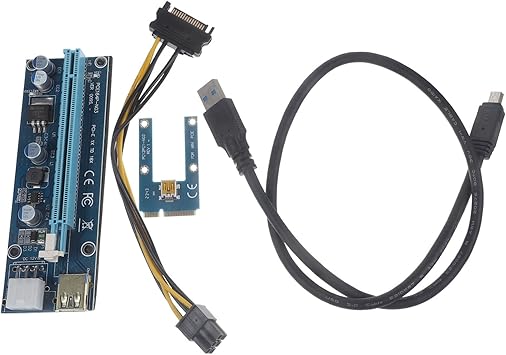
External Gpu for Laptop Adapter with USB Cable for Enhanced Graphics Performance and Expandability
товар №:
133731266
TJS 410
Price Details
Excluding Shipping & Custom charges ( Shipping and custom charges will be calculated on checkout )
*All items will import from США
0 ratings
Написать отзыв
В наличии
 Импортировано из магазина USA
QTY:
Закажите сейчас и получите товар приблизительно Вторник, Август 04
Secured transaction
Ubuy works hard to protect your security and privacy. Our advanced payment security system ensures confidentiality by encrypting your information during transmission using AES (Advanced Encryption Standards) and SSL (Secure Socket Layer) protocols. Your payment details are 100% secure as we do not share your payment details with third party sellers.
Our Top Logistics Partners


By adding an external graphics card, gain access to higher graphics processing power and improved performance for graphics-intensive applications.

Fast
Shipping

Free
Return*

Secure Packaging

100% Original Products

PCI DSS Compliance

ISO 27001 Certified


Note: Step Down Voltage Transformer required for using electronics products of США store (110-120). Recommended power converters Купите сейчас.


What Stands Out
Enhanced Performance
Experience superior graphics performance with this external GPU adapter, allowing laptops to run demanding applications and games smoothly, significantly improving visual quality and responsiveness.
Easy Expandability
Easily expand your laptop's capabilities with this plug-and-play device, offering effortless connectivity and compatibility with various GPU models, ensuring future-proofing as technology evolves.
Convenient USB Connection
Utilize a simple USB connection for hassle-free setup and mobility, making it ideal for users needing powerful graphics on-the-go without sacrificing convenience or functionality.
Информация о продукте
| Item Weight | 4 lbs (1.81 kg) |
Who Should Buy?

-
Gamers
This product enhances graphics performance, allowing gamers to play demanding titles on laptops with superior quality and frame rates.
-
Creative Professionals
Photographers and video editors can benefit from improved rendering speeds and performance in graphic-intensive applications using this adapter.
-
Multi-Taskers
Users requiring additional screens or enhanced performance for multitasking can expand their setup with this external GPU.

-
Casual Users
Individuals who use their laptops for basic tasks like browsing or office applications won’t benefit from this product.
-
Budget-Conscious
The cost of the external GPU may not be justified for users with limited budgets prioritizing basic performance needs.
-
Non-Gaming Laptops
Laptops lacking the necessary ports or hardware support may not be compatible, limiting utility for non-gaming models.
ОПИСАНИЕ ТОВАРА
External Gpu for Laptop Adapter with USB Cable for Enhanced Graphics Performance and Expandability
Есть вопрос? Пообщайтесь с нами в чате
Вопросы и ответы клиентов
-
вопрос:
What is an external GPU for laptop and how does it work?
отвечать: An external GPU (eGPU) is a device that connects to your laptop to enhance its graphics processing capabilities. It typically uses a high-speed interface like Thunderbolt or USB-C to link with the laptop. This setup allows the laptop to utilize the powerful graphics card housed in the eGPU, leading to improved frame rates and rendering in demanding applications like gaming and graphic design. For instance, gamers can play resource-intensive games at higher settings, while graphic designers can run complex software smoothly, which would otherwise be limited by the laptop's onboard graphics. -
вопрос:
What are the benefits of using an external GPU for my laptop?
отвечать: Using an external GPU significantly boosts your laptop's graphics performance, allowing you to handle intensive tasks such as gaming, video editing, and 3D rendering without compromising on speed or quality. In addition to enhanced performance, it also provides expandability options as you can upgrade your GPU separately, keeping your laptop relevant with the latest technology. For example, if you're a gamer who plays various titles, a high-performance eGPU can help you achieve smoother gameplay and better visual fidelity, giving you an edge in competitive settings. -
вопрос:
Does my laptop support an external GPU?
отвечать: To determine if your laptop supports an external GPU, check for compatible ports such as Thunderbolt 3 or USB-C. Many modern laptops are designed with these interfaces, facilitating the connection to eGPUs. Additionally, you can look into your laptop’s specifications or manufacturer guidelines to confirm compatibility. If you're planning to upgrade your graphics capabilities, ensure that your laptop meets these hardware requirements. For instance, a sleek ultrabook may support USB-C connections but might lack the required bandwidth for high-performance gaming with an eGPU. -
вопрос:
What types of USB cables are best for connecting an external GPU?
отвечать: The best connection for an external GPU is typically a Thunderbolt 3 cable, as it provides high data transfer rates essential for graphics-intensive applications. If your eGPU and laptop support it, this option is ideal for maximum performance. Alternatively, some eGPUs might offer USB-C connections, but performance could be limited compared to Thunderbolt. For example, connecting your eGPU with a Thunderbolt 3 cable allows for seamless gameplay without lag, while a standard USB-C connection may not deliver the same high-speed performance for textures or frame rates. -
вопрос:
Can I use my external GPU for tasks other than gaming?
отвечать: Absolutely! While gaming is a popular use for external GPUs, they also excel in graphic design, video editing, and 3D modeling. Software applications like Adobe Creative Suite and Blender can leverage the additional graphical power, resulting in faster rendering times and improved workflow. For instance, a video editor can effectively preview high-resolution footage without stutters, making the editing process much more efficient. This versatility makes eGPUs an excellent investment for creative professionals seeking to boost their productivity. -
вопрос:
How do I set up an external GPU with my laptop?
отвечать: To set up your external GPU, begin by connecting it to your laptop using the appropriate cable—ideally Thunderbolt 3 for peak performance. Next, install any necessary drivers provided by the eGPU manufacturer and, if applicable, connect a separate monitor for enhanced display options. After installation, you may need to configure your graphics settings through your operating system to ensure the eGPU is recognized as your primary graphics processor. This setup lets you transition seamlessly between tasks, ideal for users who require high-quality visuals in their work. -
вопрос:
Are external GPUs portable?
отвечать: While external GPUs are designed to be portable, their ease of transportation depends on the model and its design. Some eGPUs are compact and lightweight, making them easy to carry along with your laptop for on-the-go gaming or work. However, larger units may be bulkier and less convenient for frequent travel. For users who frequently shift between locations, consider opting for a slim and lightweight eGPU. This way, you can enjoy high performance without the hassle of bulky equipment disrupting your travel plans or workspace. -
вопрос:
Can I use multiple external GPUs with my laptop?
отвечать: Using multiple external GPUs with your laptop depends on the compatibility of your system. While some laptops may support technologies like NVIDIA SLI or AMD CrossFire, they often require specific hardware and software configurations. If supported, combining multiple eGPUs can significantly enhance performance and allow for multi-monitor setups, particularly beneficial for gaming and creative tasks. For example, developers or designers can gain from the increased computing power, allowing complex simulations or renders to be processed concurrently, reducing overall workflow time. -
вопрос:
Where can I buy an external GPU for laptop adapter with USB cable in Tajikistan?
отвечать: You can purchase an external GPU for laptop adapter with USB cable from Ubuy. They offer a wide selection of high-quality eGPU units and accessories tailored to your graphics enhancement needs. Additionally, Ubuy often provides detailed product specifications and support to help you choose the right option based on your laptop's compatibility and performance requirements. This makes it easier for you to find the ideal external GPU to elevate your laptop's graphics capabilities.
Graphics Cards Editorial Review
Редакционных отзывов не найдено
Customer Reviews & Ratings
1 оценки клиентов
-
5 звезда
100%
-
4 звезда
0%
-
3 звезда
0%
-
2 звезда
0%
-
1 звезда
0%
Оцените этот товар
Поделитесь своими впечатлениями
Product Price History
Важная информация
- Ограничения: обратите внимание, что для товаров, поставляемых за границу, гарантия производителя может быть недействительной; обслуживание от производителя может быть недоступно; руководства по эксплуатации, а также инструкции и предупреждения о безопасности могут быть не на языках страны назначения; товары (и сопутствующие материалы) могут не быть разработаны в соответствии со стандартами, спецификациями и требованиями к маркировке страны назначения; товары также могут не соответствовать напряжению в стране назначения и другим электрическим стандартам (при необходимости требуется использование адаптера или преобразователя). Получатель несет ответственность за обеспечение законного ввоза товара в страну назначения. При заказе через Ubuy или его аффилированных лиц получатель является зарегистрированным импортером и должен соблюдать все законы и правила страны назначения.
- Не все товары на Ubuy выставлены на продажу, поскольку Ubuy — это глобальная поисковая система. На товары распространяются законы в области экспорта и торговли.
TJS 410
Закажите сейчас и получите товар приблизительно Вторник, Август 04
This item is not restrict in my country.(Please click on above link if this item is not restrict in your country, So our team will review and allow.)
QTY:
Secured transaction
Ubuy works hard to protect your security and privacy. Our advanced payment security system ensures confidentiality by encrypting your information during transmission using AES (Advanced Encryption Standards) and SSL (Secure Socket Layer) protocols. Your payment details are 100% secure as we do not share your payment details with third party sellers.
Our Top Logistics Partners
Fastest cross-border delivery
Особенности и преимущества
- Enhances graphics performance for laptops.
- Improves rendering times for graphics-intensive tasks.
- Offers a larger and more immersive visual experience.
- Designed for gamers and multimedia enthusiasts.
- Provides multiple connectivity options for external displays.
- Increases graphics processing capability and expandability.