- Домашняя страница /
- Электроника /
- Computer Accessories /
- Computer Accessories & Peripherals /
- Computer Memory Card Accessories /
- Sintech PCIe 4.0 x4 to Oculink,Oculink SFF-86...
0 ratings

товар №:
120092433
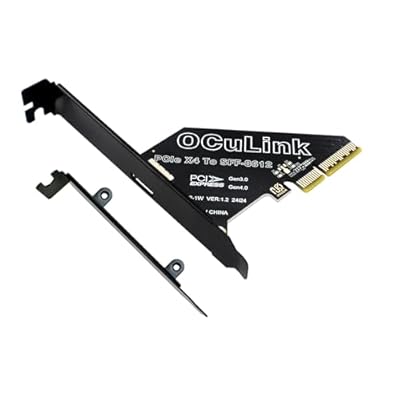
Sintech PCIe 4.0 x4 to Oculink,Oculink SFF-8611 to PCI-e Adapter Card with Low Profile Bracket for eGPU Dock Mimi Pc
товар №:
120092433
TJS 355
Price Details
Excluding Shipping & Custom charges ( Shipping and custom charges will be calculated on checkout )
*All items will import from США
0 ratings
Написать отзыв
В наличии
 Импортировано из магазина USA
QTY:
Закажите сейчас и получите товар приблизительно Monday, Июль 06
Secured transaction
Ubuy works hard to protect your security and privacy. Our advanced payment security system ensures confidentiality by encrypting your information during transmission using AES (Advanced Encryption Standards) and SSL (Secure Socket Layer) protocols. Your payment details are 100% secure as we do not share your payment details with third party sellers.
Our Top Logistics Partners


Transform your desktop with the Sintech Oculink Adapter for seamless connections to eGPU and external SSDs.

Fast
Shipping

Free
Return*

Secure Packaging

100% Original Products

PCI DSS Compliance

ISO 27001 Certified


Note: Step Down Voltage Transformer required for using electronics products of США store (110-120). Recommended power converters Купите сейчас.


What Stands Out
High-Speed Connectivity
Supports PCIe 4X interface, ensuring rapid data transfer speeds for intense applications, enhancing overall system performance.
Versatile Compatibility
Designed for SFF-8611/8612 connectors, this adapter card seamlessly integrates with various hardware setups, offering flexible upgrade options.
Robust Design
Engineered for reliability, this adapter card ensures stable performance under heavy loads, delivering exceptional quality and long-term durability.
Информация о продукте
| Item Weight | 0.2 lbs (90 grams) |
Who Should Buy?

-
Data Center Managers
Ideal for data centers needing efficient PCIe expansion for enhanced server connectivity and performance optimization.
-
System Builders
Perfect for custom PC builders incorporating additional storage or high-speed connections into their systems.
-
IT Professionals
Suitable for IT technicians requiring a reliable interface for connecting multiple devices with PCIe support.

-
Casual Users
Not suitable for everyday users who do not require advanced connectivity options or upgrades.
-
Budget-Conscious Buyers
May not fit those seeking low-cost solutions because of its specialized features and higher price point.
-
Basic Gamers
Gamers who play non-demanding games likely won't benefit from this advanced interface adapter card.
ОПИСАНИЕ ТОВАРА
Sintech PCIe 4.0 x4 to Oculink,Oculink SFF-8611 to PCI-e Adapter Card with Low Profile Bracket for eGPU Dock Mimi Pc
Есть вопрос? Пообщайтесь с нами в чате
Вопросы и ответы клиентов
-
вопрос:
What is the Sintech PCIe 4.0 x4 to Oculink adapter used for?
отвечать: The Sintech PCIe 4.0 x4 to Oculink adapter is designed to allow high-speed connections between a PCIe 4.0 interface and Oculink-compatible devices. This is particularly useful for connecting eGPU docks to mini PCs, enabling robust graphics performance for demanding applications such as gaming and video editing. This adapter plays a critical role in enhancing computing capabilities by providing low-latency and high-bandwidth connections, making it ideal for content creators and gamers looking for seamless performance. -
вопрос:
How does the Sintech PCIe 4.0 x4 to Oculink adapter improve performance?
отвечать: By leveraging PCIe 4.0 technology, the Sintech adapter significantly boosts data transfer rates compared to its predecessors. This results in improved graphics rendering and faster data processing, which is crucial for tasks like gaming or running intensive software. The enhanced bandwidth allows multiple data streams to operate simultaneously, providing a smoother and more responsive user experience, especially in high-demand scenarios such as VR gaming or 3D modeling. -
вопрос:
What devices are compatible with the Sintech PCIe to Oculink adapter?
отвечать: This adapter is compatible with a variety of devices that support Oculink ports, including specific eGPU docks and mini PCs. It is essential for users who need to connect an external GPU for enhanced graphics capabilities. Ensure your mini PC has the appropriate PCIe slots and that your eGPU dock supports the Oculink connection to utilize this adapter effectively. -
вопрос:
Can I use the Sintech adapter for other applications outside of gaming?
отвечать: Yes, the Sintech PCIe 4.0 x4 to Oculink adapter is versatile and can be used for various applications beyond gaming. It is suitable for tasks like video editing, 3D rendering, and CAD applications, where high-performance graphics processing is required. Professionals in graphic design or software development can benefit from the enhanced performance delivered by this adapter, improving workflow efficiency. -
вопрос:
Is the Sintech PCIe to Oculink adapter easy to install?
отвечать: Installing the Sintech PCIe to Oculink adapter is straightforward, as it typically involves inserting the card into an available PCIe slot in your mini PC. Ensure to follow the provided installation instructions for optimal performance. Additionally, most users find it intuitive to connect the necessary cables for an eGPU setup, making it a user-friendly solution for enhancing system capabilities. -
вопрос:
What advantages does PCIe 4.0 offer compared to previous versions?
отвечать: PCIe 4.0 doubles the bandwidth available compared to PCIe 3.0, offering 64 GB/s in total. This increased capacity allows for more devices to communicate with the system simultaneously, reducing bottlenecks and improving overall efficiency. For users utilizing high-performance GPUs or needing to transfer large amounts of data quickly, PCIe 4.0 significantly enhances system responsiveness and performance, particularly in high-demand environments. -
вопрос:
What is Oculink, and why is it important for external GPU connections?
отвечать: Oculink is a versatile interface that supports high-speed data transfer for peripherals like external GPUs. Its compact design makes it ideal for connecting devices in space-constrained environments, such as mini PCs. Utilizing Oculink minimizes latency and maximizes data throughput, ensuring a seamless connection between the eGPU and the host device, which is crucial for maintaining high performance in graphic-intensive tasks. -
вопрос:
Can the Sintech PCIe to Oculink adapter support multiple GPUs?
отвечать: The capability to support multiple GPUs depends on the specific setup of your mini PC and available PCIe lanes. While the Sintech adapter is devised to connect a single eGPU, certain systems can accommodate additional graphics cards through other available slots, potentially allowing multi-GPU configurations. Be sure to check your mini PC's specifications to verify compatibility with multiple GPUs. -
вопрос:
How do I ensure my mini PC supports the Sintech PCIe to Oculink adapter?
отвечать: To confirm compatibility with the Sintech PCIe to Oculink adapter, review the specifications of your mini PC to ensure it features appropriate PCIe slots and is capable of supporting Oculink connections. Look into the motherboard manual or manufacturer’s website for details. A supported setup guarantees that you can take full advantage of the high-speed connection that this adapter offers. -
вопрос:
Where can I buy the Sintech PCIe 4.0 x4 to Oculink adapter in Tajikistan?
отвечать: You can purchase the Sintech PCIe 4.0 x4 to Oculink adapter from Ubuy, which offers a variety of tech products including this adapter. Ubuy provides an accessible platform for browsing and purchasing the latest tech accessories, ensuring you can find the product conveniently and reliably from your location in Tajikistan.
Sintech Memory Card Accessories Editorial Review
Редакционных отзывов не найдено
Customer Reviews & Ratings
1 оценки клиентов
-
5 звезда
100%
-
4 звезда
0%
-
3 звезда
0%
-
2 звезда
0%
-
1 звезда
0%
Оцените этот товар
Поделитесь своими впечатлениями
Product Price History
Важная информация
- Ограничения: обратите внимание, что для товаров, поставляемых за границу, гарантия производителя может быть недействительной; обслуживание от производителя может быть недоступно; руководства по эксплуатации, а также инструкции и предупреждения о безопасности могут быть не на языках страны назначения; товары (и сопутствующие материалы) могут не быть разработаны в соответствии со стандартами, спецификациями и требованиями к маркировке страны назначения; товары также могут не соответствовать напряжению в стране назначения и другим электрическим стандартам (при необходимости требуется использование адаптера или преобразователя). Получатель несет ответственность за обеспечение законного ввоза товара в страну назначения. При заказе через Ubuy или его аффилированных лиц получатель является зарегистрированным импортером и должен соблюдать все законы и правила страны назначения.
- Не все товары на Ubuy выставлены на продажу, поскольку Ubuy — это глобальная поисковая система. На товары распространяются законы в области экспорта и торговли.
TJS 355
Закажите сейчас и получите товар приблизительно Monday, Июль 06
This item is not restrict in my country.(Please click on above link if this item is not restrict in your country, So our team will review and allow.)
QTY:
Secured transaction
Ubuy works hard to protect your security and privacy. Our advanced payment security system ensures confidentiality by encrypting your information during transmission using AES (Advanced Encryption Standards) and SSL (Secure Socket Layer) protocols. Your payment details are 100% secure as we do not share your payment details with third party sellers.
Our Top Logistics Partners
Fastest cross-border delivery
Особенности и преимущества
- Converts PCIe 4X/16X slots to Oculink SFF-8611/8612 interfaces.
- Includes a low profile bracket for industrial PC cases.
- Compatible with eGPU cards using Oculink extension cables.
- Connects to external nVME SSD cases effortlessly.
- Designed for systems running WIN 10 or MAC OS 10.13 and later.
- Enhance performance and expand your connectivity options.